For teachers

Send wonder home in a school bag

A printed card, an outdoor mission, a quiet tick on your board. Wundoria's classroom loop takes minutes to run, holds no child data, and costs your school nothing - ever.

Home educating? Your section is further down - World One is free for every family, and the kit works on paper.

Free for schools, always Pupil numbers, never names No child accounts, no logins for children The name register stays in your hands
The whole idea

One story. One mission. One walk a week.

  1. A story in class

    You read or play the world's story-poem and teach a short lesson from your kit.

  2. A card in the school bag

    Each child takes home a numbered card with this week's mission on it.

  3. A mission outside, together

    At home, a grown-up scans the card and they do the mission side by side.

  4. A tick on your board

    You see "pupil 04 ✓" and a smiley. Never a name, never a photo.

That is enough, and it is a great deal. There is nothing to mark and nothing to upload. What you notice instead is a child who walks in on Monday a little taller.

How the card system works

From your classroom to their front door, step by step

Most teachers set this up on a laptop in about five minutes. Here is exactly what happens, and what you will see.
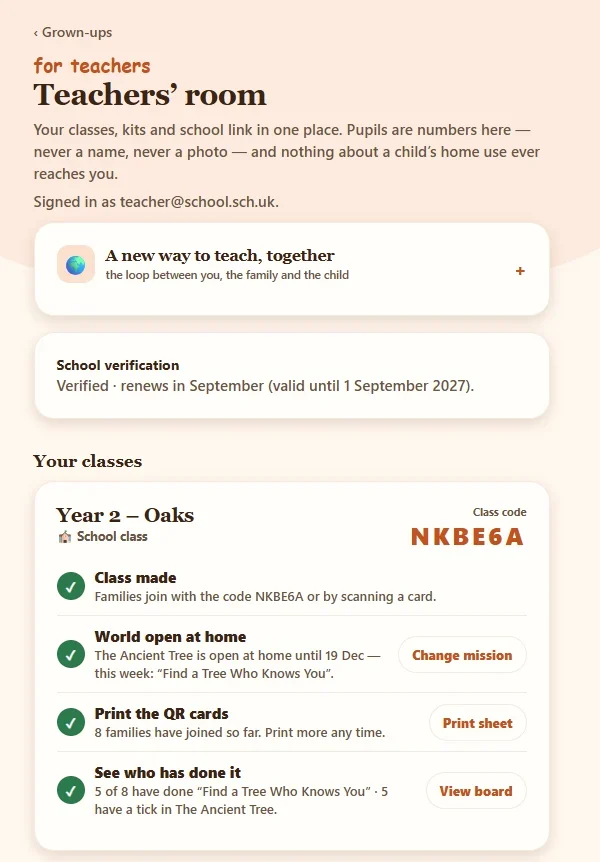
The Teachers' room in the Wundoria app, showing a class with its code and four steps ticked off
1

Make a class

Sign in to the Teachers' room with your school email and name your class. You get a six-letter class code and a class QR straight away.

Tell me more

The Teachers' room lives at app.wundoria.org/teachers and works best on a laptop. Each class shows as four simple steps that tick themselves off as you go: class made, world open at home, cards printed, see who has done it.

You can run up to three classes, with up to 35 pupils in each. Creating a class, printing cards and the progress board all work straight away. Confirming your school email (a link we send, or a quick check with your school office) is only needed to open worlds to families, and it renews each September.
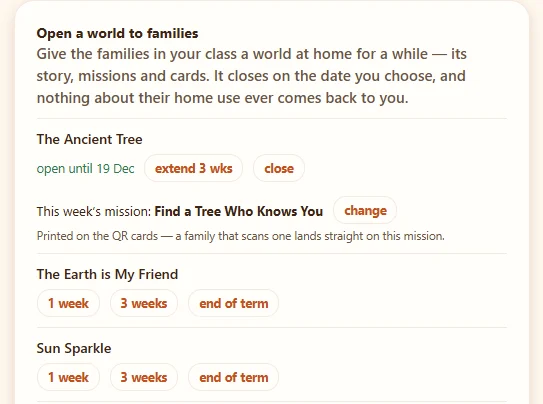
The open a world panel: The Ancient Tree open until 19 December, with this week's mission Find a Tree Who Knows You
2

Open a world and choose this week's mission

Pick the world your class is reading, how long it stays open at home, and the one mission you would like families to do this week.

Tell me more

Open a world for a week, three weeks or to the end of term, and extend or close it with a tap. World one, The Nature of Me, is free for every family already, so it never needs opening.

This week's mission is the clever part. Whatever you choose is printed on every card and built into its QR code, so a family that scans lands straight on that mission, not on a menu. Change it next week and print a fresh set.
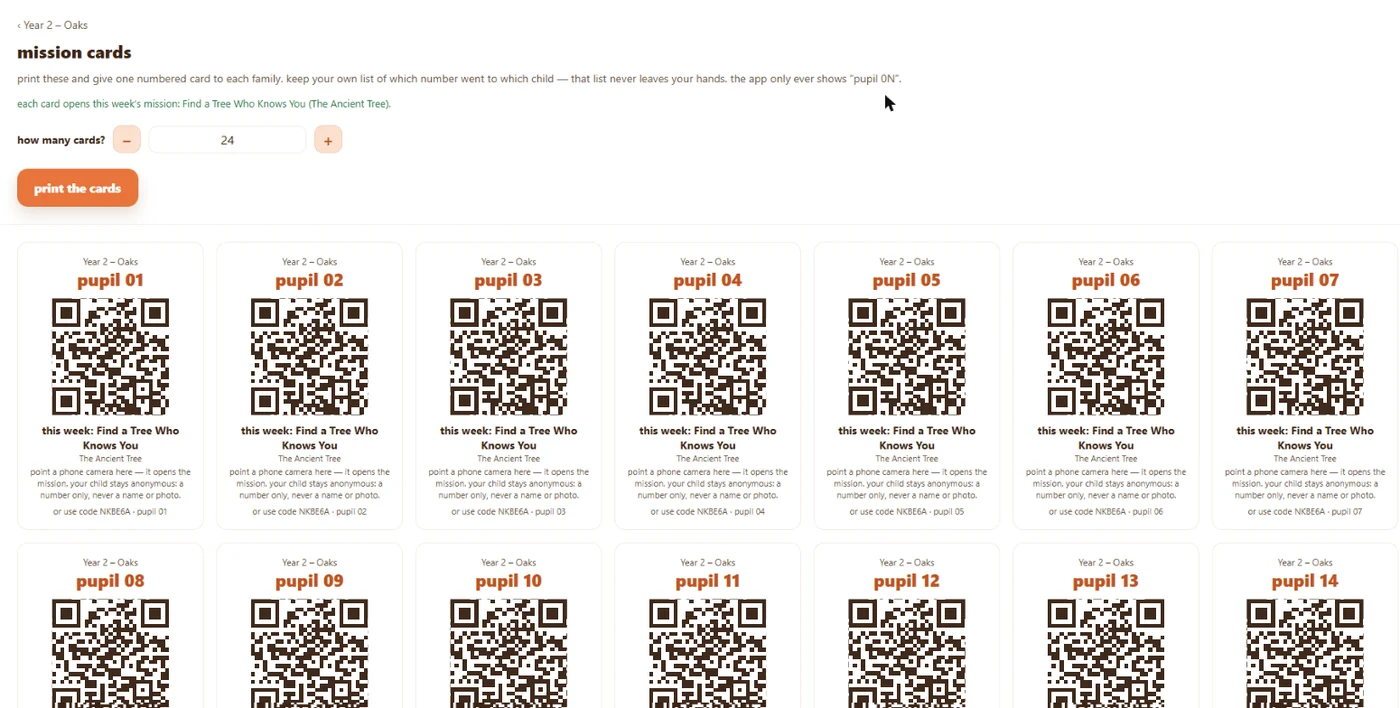
A sheet of numbered mission cards, pupil 01 to pupil 14, each with its own QR code and this week's mission
3

Print the numbered cards

One click gives you a sheet of cards, one per pupil, numbered 01, 02, 03 and so on, each with its own QR code.

Tell me more

Choose how many you need (24 to start, up to 120) and print from your browser. Every card carries the class name, the pupil number, its own QR code, this week's mission and the class code as a back-up.

Cut them up and you are ready. Lost one? Print more any time; a number always belongs to the same pupil.
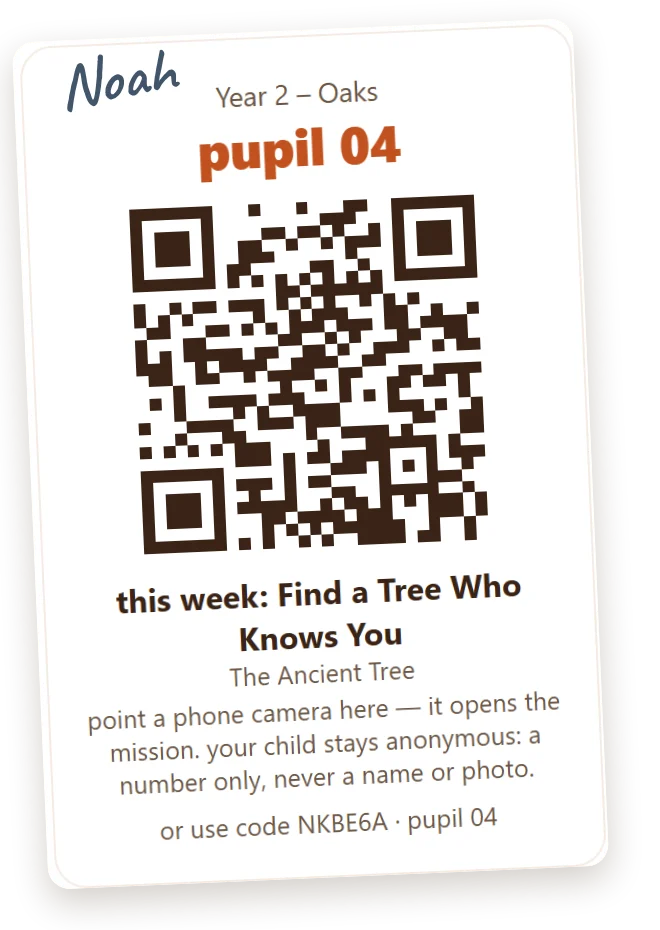
A printed mission card for pupil 04 with the name Noah pencilled in the corner
4

Write a name on each card

Before the cards go home, pencil each child's name on their card. The name is for you and the family. It never goes into Wundoria.

Tell me more

Keep your own list of which number went to which child: on the class list, in your planner, wherever you keep things. That list is the only place a number meets a name, and it stays with you.

If you like, you can also type first names against the numbers on your progress board (step 7). Those names are saved on your own computer only. They are never sent to us, never seen by a family, and if you open the board on another device they are simply not there.
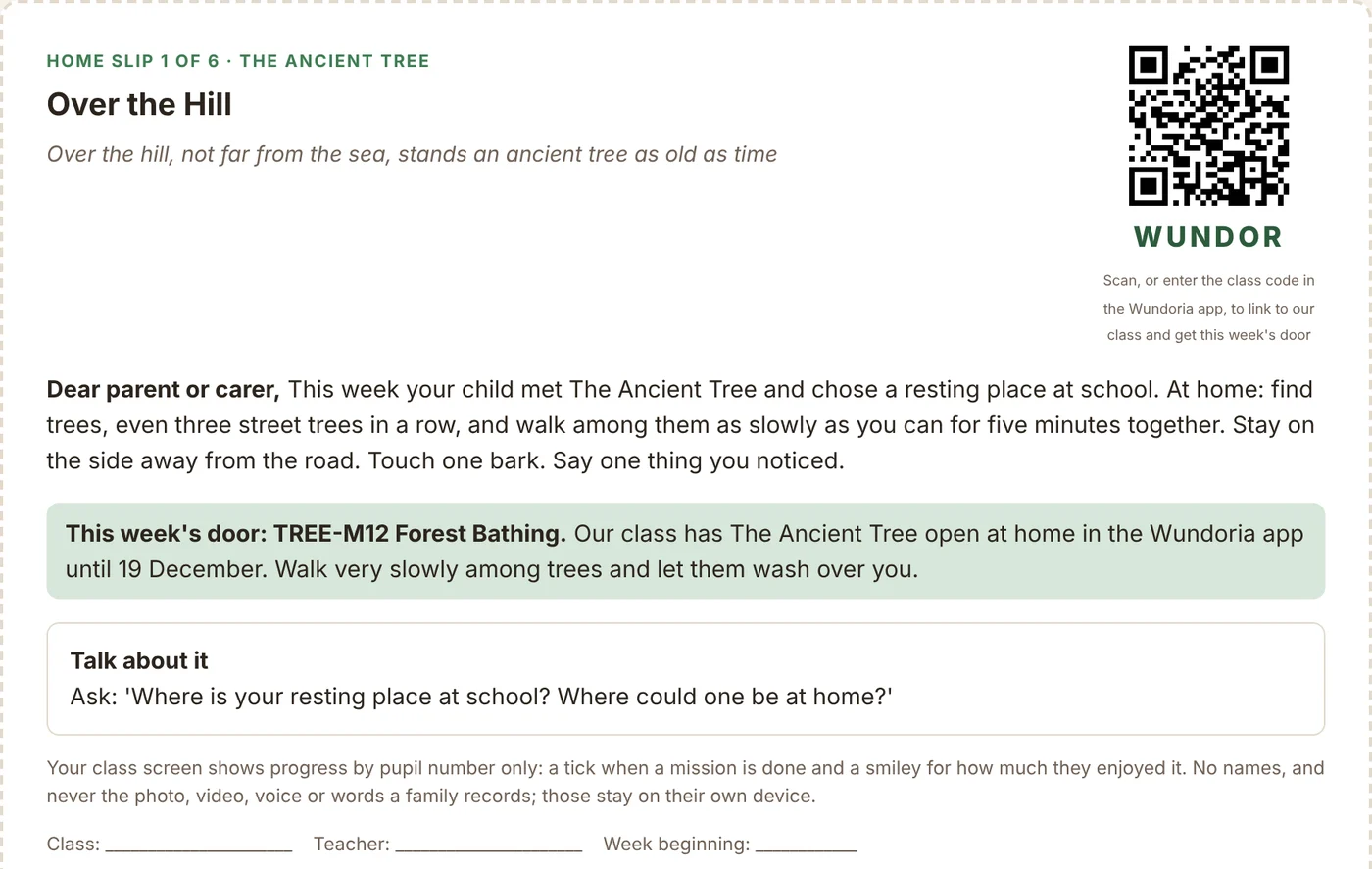
A home slip for parents with the week's mission, a talk about it question and the class QR code
5

The card goes home in the school bag

At home a grown-up points their phone camera at the card, signs in once with a code we email them, and lands straight on this week's mission.

Tell me more

Scanning card 04 makes that child pupil 04 in your class: a number, never a name. Scanning again later is harmless, and if a card has already been used by another family the app says so, so numbers never get muddled.

Children never sign in and never have an account. Families who would rather not use the app get the same mission on paper: every kit has a home slip for each lesson, like this one. The lesson happens in class and the mission happens at home, so a child whose family does neither is never behind.

6

They do it together, outside

The mission is the part that matters: ten slow minutes among trees, a walk to the corner, a look at the moon. The phone waits in a pocket.

Tell me more

Missions are written for real homes, so a pavement, a window or a patch of sky is enough. Afterwards the family can keep a photo, a drawing or a voice note in their Wonder Journal. Those stay on the family's own phone. They never reach school, and they never reach us.
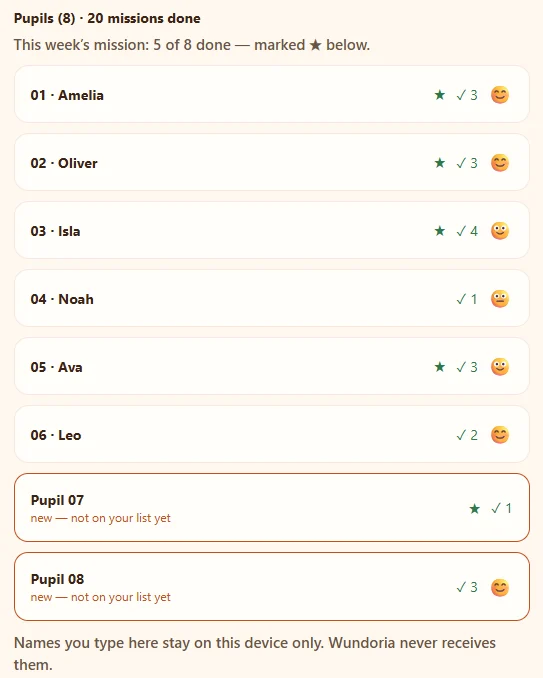
The class progress board: pupil numbers with ticks, stars for this week's mission and smileys for enjoyment
7

A tick appears on your board

When the child finishes, "pupil 04 ✓" appears on your board, with a smiley for how much they enjoyed it.

Tell me more

The board shows every pupil number, how many missions each has done, a star next to everyone who has done this week's mission, and a smiley for how it felt. At the top it tells you how many of the class have done this week's mission.

Tap a number to type a first name if you would like to; anyone you have not named yet shows as "new, not on your list yet", so you can spot who has just joined. You can export your names as a file for your own records. Nothing else ever comes back from home: no photos, no words, no times, no locations.

Three ways in, so no family is left out

The numbered card

Best for a whole class: each child already has their number, and the card opens this week's mission.

The class QR or code

On your class poster and every home slip. The family scans or types the code, then the child tells you the number they were given.

Paper only

The home slip carries the same mission in words, for families who would rather not use an app at all.
Ready to teach

A teacher kit for every world

Eight kits, one for each world, with six short lessons in each. Free for schools, and your class code and QR are filled in for you.

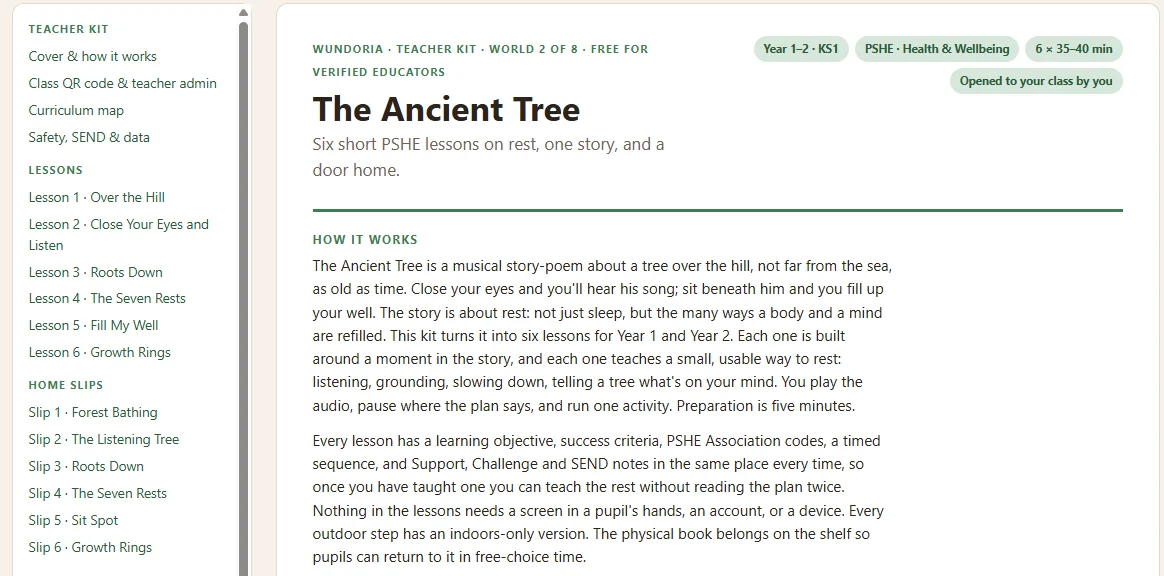
The Ancient Tree teacher kit: six PSHE lessons on rest, home slips and printables

Six lessons

35 to 40 minutes each, built around a moment in the story.

Tell me more

Every lesson has a learning objective, success criteria, PSHE Association codes, a timed sequence, and support, challenge and SEND notes in the same place every time. You play the audio, pause where the plan says, and run one activity. Preparation is about five minutes.

Nothing in the lessons needs a screen in a pupil's hands, an account or a device, and every outdoor step has an indoor version.

Six home slips

One per lesson, to send the mission home.

Tell me more

Each slip carries a line from the poem, what to do at home in a few plain sentences, this week's mission, a question to talk about, and your own class QR and code. Print one slip or all six straight from the page.

Printables

Activity sheets, a feelings check-in and a certificate.

Tell me more

The feelings check-in is coloured before and after a lesson, so the first and last lessons give you a gentle before and after for the unit. There is also a class QR poster for the wall, which families can scan to join.

Curriculum and safety

A curriculum map, plus a page on safety, SEND and data.

Tell me more

Each world is mapped to the published CASEL framework, the PSHE Association programme and RSHE, with EYFS links for the youngest. Wundoria is not affiliated with or endorsed by these organisations.

Nursery, early years and SEN groups

For keyworker groups of three to five year olds there is a simpler printable pack: numbered slips with a line to write each child's name on, and a register you fill in by hand. The same rule holds: the names stay on paper, with you.

Designed for how schools actually work

Zero data-protection headache

We hold no pupil names, no photos, no emails - there is nothing about your class on our servers to worry about. The pseudonymous design means the DPO conversation is a short one.

Built on SEL foundations

Each world maps to a social-emotional competency - self-awareness, self-management, social awareness, relationship skills, responsible decision-making - through story and time outdoors.

Works without perfect homes

Missions need a pavement, a window or a patch of sky - not a garden, equipment or a subscription. World one is free for every family in your class.

Free is not a trial

"Free for teachers, always" is promise number seven of the eight we publish. The classroom side of Wundoria will never cost a school anything.

For home educators

Stories that end outside - at your pace, in your week

You don't need a class, a code or a school to use Wundoria. Every world starts with a story-poem and ends with a set of outdoor missions to choose from; the first world is free for every family, forever, and the kit works on paper with no device at all.

World One, free for every family

The story, outdoor missions plus one you make yourselves, a new one every week, the matching cards and the keepsake journal. No card details, no child accounts, and nothing your child makes ever leaves your own device.

Three age lines on every mission

One mission, adjusted for 3-5, 6-8 and 9-10, with adaptations for children who find waiting, eye contact or big feelings hard - so siblings can do the same mission side by side.

Something to show, if you ever need it

Each mission is mapped to the published CASEL framework and to the PSHE Association programme and EYFS areas. The keepsake journal keeps a dated photo, drawing or voice note per mission. Turn on Home-education mode in the app and it builds a Provision Record from what you have done, on your own device, ready to print or save as a PDF.

Seven more worlds, priced once

Every new family's first month opens everything, with no card. After that: 99p a world, or all the others together for £4.99. Wundoria Plus adds the every-day habit missions, the daily doors and new worlds as they arrive - never required to keep what you have.

Meet as a group - forest school, a co-op, a park crowd? One of you can host a Wundoria group and try a world together for three weeks: up to twelve families, one world at a time, two worlds a year. A group is families who actually meet, and each family keeps its own Wundoria. Founding Families, our free-forever programme for outdoor and home-ed families who help spread the word, is open now: founding families.

Mapping is Wundoria's own, against the published CASEL, PSHE Association and EYFS frameworks. Wundoria is not affiliated with or endorsed by these organisations. Home education in England is overseen by your local authority, not Ofsted.

Rather have a hand getting started?

Talk to us about your school

Teacher admin is open now: confirm your school email and you can set up a class yourself in a few minutes. If you'd like us alongside, or your school email isn't recognised, leave a school email and we'll be in touch with the World One kit, mission cards and a walk-through.

Your email only - never pupil data. We never share it, and you can ask us to remove it any time.